Step-by-step guide

How to set up a Google Business Profile as a home-based insurance agent.

Yes, an insurance agent can have a Google Business Profile. Because you meet clients face to face, Google counts you as eligible. If you work from home, you register as a service area business and keep your home address hidden. If you have an office, you list it as a real location instead. This guide walks you through every screen for both.

8 steps · about 30 minutes to submit · about 5 business days to approval
Read this first

The one rule that saves home-based agents from suspension

Most agents who get rejected or suspended make the same mistake: they list their home as a storefront. Google only wants a physical address on a profile when customers actually travel there. You go to your clients, so your home is not a place of business in Google's eyes. Set yourself up as a service area business instead, and your address stays private.

Never display your home address

If you show a residential address that customers do not visit, Google can suspend the profile. Answer No to "do customers visit you" during setup, and Google hides the address automatically while still ranking you for the towns you serve.

You qualify because you meet clients in person

Google requires in-person contact with customers to have a profile. A face-to-face insurance agent meets that bar. An agent who only sells over the phone or online does not, so your home and office visits are exactly what make you eligible.

Pick your path

Two situations, one that fits you

Before you start, decide which describes your business. The setup is almost identical, and only one screen changes between them: the location question in Step 5.

You work from home and go to clients

You meet people at their homes, their workplaces, or over coffee, and you do not have an office they come to. You are a service area business.

Answer No to "do customers visit you." Your home address stays hidden. You rank for the towns you serve.

You have an office customers can visit

You have a staffed office, storefront, or suite that clients walk into. You list it as a real location so it shows on the map and in local search.

Answer Yes and enter the office address. If you also travel to clients, add service areas too. Google calls this a hybrid business and it is fully allowed.

Before you start

Gather these first

Having these ready means you can finish setup in one sitting and pass verification on the first try.

What to have on hand

Your exact business name as it appears on your license and marketing, with nothing added. A dedicated business Google account. A consistent business phone number. Your website URL, or a simple landing page if you do not have a site yet.

For verification

The list of cities, counties, or ZIP codes you serve, and proof the business is real: your agent license, E and O insurance declarations page, appointment or carrier letters, or business bank mail.

The walkthrough

Set up your profile in 8 steps

Follow these in order. Each step matches a screen inside the Google Business Profile signup flow.

1. Confirm you are eligible

Google allows a profile for any business that makes in-person contact with customers. Because you meet clients face to face, you qualify. Keep your in-person meetings central to how you describe the business.

2. Create a business Google account

Use a Google account that belongs to the business, not your personal Gmail. This keeps ownership clean if you later add an assistant or agency to manage the profile.

3. Start at business.google.com

Go to business.google.com and click Manage now. Search your exact business name first. If a profile already exists that you did not create, claim it rather than make a duplicate. Duplicates get merged or suspended.

4. Enter your real name and category

Type your true business name exactly, with nothing added. "Jordan Miller Insurance" is fine. "Jordan Miller Insurance - Cheap Life Insurance Dallas" gets you suspended for keyword stuffing. Primary category: Insurance agency.

5. Choose service area, not a storefront (the critical screen)

Google asks: "Do you want to add a location customers can visit, like a store or office?" Answer No. This is the single most important choice in the whole setup. It registers you as a service area business and keeps your home address off the public profile.

On an existing profile, set the same thing under Business information > Location. Click the edit pencil next to Business location, then choose "No location; deliveries and home services only." That one setting is what makes you a service area business.
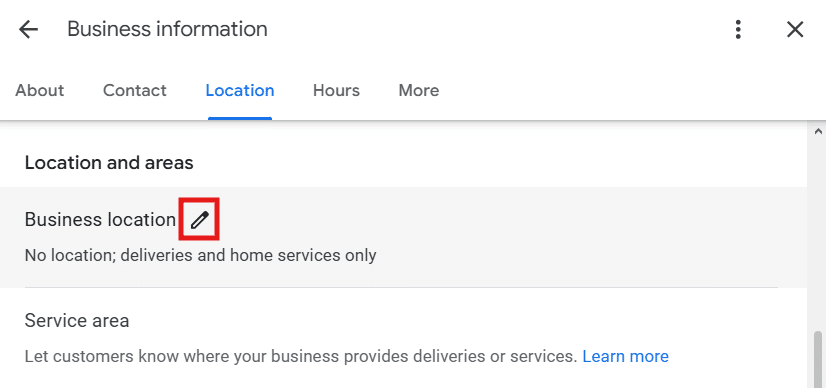
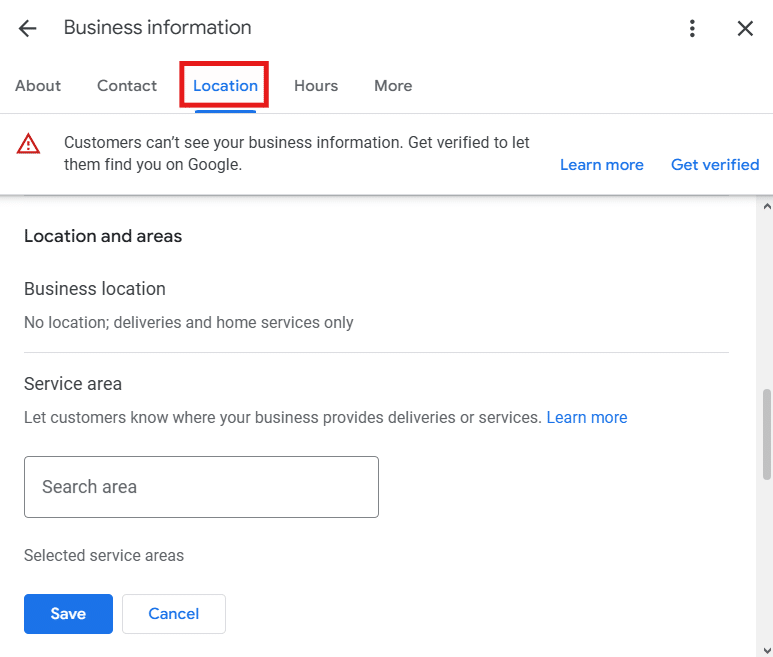
Google Business Profile Location tab with the edit pencil next to Business location Business location set to No location, deliveries and home services only, with a Service area search box

If Google asks for an address anyway: some accounts still show an address panel during setup or verification. Enter your real home address so Google can confirm where you are based, then switch "Show business address to customers" to OFF. Entering the address verifies you. Turning the toggle off keeps your home private.
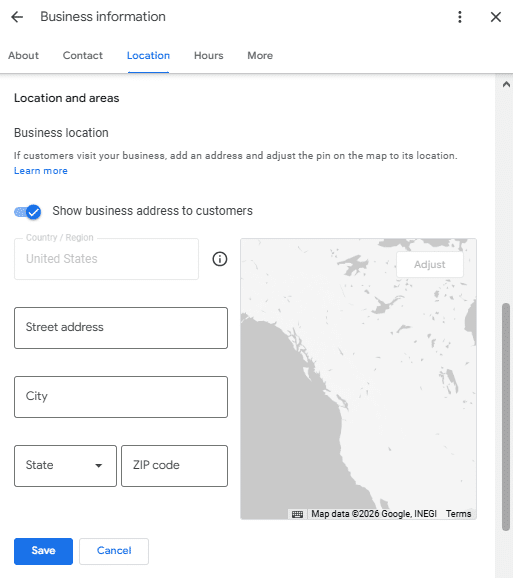
Business location address fields with the Show business address to customers toggle

If you have an office customers can visit: do the opposite on this one screen. Answer Yes to "do customers visit you," enter your real office address, and leave "Show business address to customers" set to ON, because clients actually come to that address. If you also drive out to meet clients, keep the office address on and add the towns you serve as service areas in Step 6.

6. Add the areas you serve

List the towns, counties, or ZIP codes where you actually meet clients. Add up to 20 areas, within about a two-hour drive of your base, and lead with your strongest market first. If you have an office, service areas are optional, add them only if you also travel to clients.

7. Add your phone and website

Enter the business phone number and website you will use everywhere else online. This is your name, address, and phone consistency, and it matters more than most agents realize. Mismatched details across directories cost you rank.

8. Pass verification

Google verifies most service area businesses with a short video you record on your phone in one continuous take. Approval usually follows within about five business days. If you have an office, Google may instead mail a postcard with a code, or offer the same video option.

  • Show your tools of trade: laptop with your quoting software open, branded folders, business cards, signage on your car.
  • Show proof the business is real: your agent license, E and O declarations page, or carrier appointment letter.
  • Show yourself at the end so Google sees you are the owner.
  • Do not stop or edit the recording. One clean take is what Google wants.
Get approved the first time

Do this, not that

Do

  • Use your real, unembellished business name.
  • Pick the right location type: service area if home-based, storefront if you have an office.
  • Only show an address customers can actually visit.
  • Keep name, phone, and website identical everywhere.
  • Record verification in one clean, well-lit take.

Don't

  • Add city names or keywords to your business name.
  • Publish your home address as a storefront.
  • Use a PO box or a rented virtual office you never work from.
  • Create a second profile when one already exists.
  • Rush a blurry or edited verification video.
If something goes wrong

What to do if you are rejected

Rejections happen, and they are usually fixable. If your video is declined, record a clearer one that plainly shows your license or E and O documents and your tools of trade. If the profile is suspended, do not create a new one. Fix the underlying issue, then use the Business Profile appeal form to request a manual review. Most appeals are answered within about a week. Once you see the green "Verified" badge, you are live, and the next move is to fill out every field and start collecting reviews, which is where ranking actually happens.

Keep going

Next, optimize the profile so it actually ranks.

Questions

Google Business Profile setup, answered.

Can an insurance agent who works from home have a Google Business Profile?

Yes. Google allows a Google Business Profile for any business that makes in-person contact with customers. Because you meet clients face to face, you qualify. You set up as a service area business and keep your home address hidden, listing the cities and counties you serve instead.

Do I have to show my home address on Google?

No. If customers do not come to your home, you must hide the address. During setup, answer No when Google asks whether customers can visit you. Your profile then shows your service areas instead of a street address, which keeps your home private and keeps you compliant with Google's guidelines.

What if I have an office that customers can visit?

Then you set up the opposite way on one screen. Answer Yes when Google asks whether customers can visit you, enter your real office address, and leave Show business address to customers turned on, because clients actually go there. If you also travel out to meet clients, you can keep the office address and add the towns you serve as service areas, which Google calls a hybrid business and fully allows.

How is a home-based Google Business Profile verified?

Most service area businesses are now verified by a short video. You record your tools of trade, proof that the business is real such as your agent license or E and O insurance, and yourself, without cutting the recording. Google reviews it and usually approves within about five business days.

Why do Google Business Profiles for insurance agents get suspended?

The most common causes are adding keywords to the business name, listing a home address that should be hidden, using a virtual office or PO box, or an inconsistent name, address, and phone number across the web. Use your real name, hide the address, and keep your details identical everywhere to avoid suspension.

How long does it take to get approved on Google Business Profile?

After you submit video verification, Google usually reviews and approves within about five business days, sometimes faster. If it is rejected, you can record a clearer video or request a manual review, and appeals are typically answered within a week.

Get started

Want your profile set up and verified for you?

Visible Agent sets up and verifies your Google Business Profile, then optimizes it every week so you show up when local families search for an agent and when AI assistants recommend one. Start with a free Agent Visibility Score.